Restructuring how organisers run events
Restructuring how organisers run events
Redesigning the information architecture and navigation so hosts can find, edit, and act on critical event details, without digging two pages deep.
Redesigning the information architecture and navigation so hosts can find, edit, and act on critical event details, without digging two pages deep.

My role
My role
As the Product Designer, I was responsible for: user research, ideations, high fidelity with prototyping
As the Product Designer, I was responsible for: user research, ideations, high fidelity with prototyping
Timeline
Timeline
This overhaul of the information architecture and the interface took around 6 weeks approximately
This overhaul of the information architecture and the interface took around 6 weeks approximately
Context
Context
Lemonade Social is a platform for creating and managing both in-person and virtual events. It allows users to easily set up event pages, invite participants, sell tickets, and streamline the planning process, ensuring a smooth experience for attendees.
Lemonade Social is a platform for creating and managing both in-person and virtual events. It allows users to easily set up event pages, invite participants, sell tickets, and streamline the planning process, ensuring a smooth experience for attendees.
Problem
As new features were added organically over time, the host side of managing events became increasingly difficult for users to navigate and quickly access critical information, especially during events. The settings page grew cluttered and confusing, often burying essential details two pages deep. This highlighted the need for a high-level re-evaluation of the page's design and organisation.
As new features were added organically over time, the host side of managing events became increasingly difficult for users to navigate and quickly access critical information, especially during events. The settings page grew cluttered and confusing, often burying essential details two pages deep. This highlighted the need for a high-level re-evaluation of the page's design and organisation.
Previous Designs and Updates
Previous Designs and Updates
On Left : The previous event edit and settings were were structured to provide users on the event page with preview and edit ability together. This was done by keeping the event landing page sections draggable to rearrange or hide.
On Left : The previous event edit and settings were were structured to provide users on the event page with preview and edit ability together. This was done by keeping the event landing page sections draggable to rearrange or hide.
On Right : The default first page for organizers focused on check-in, invites, stats, and social features of the platform.
On Right : The default first page for organizers focused on check-in, invites, stats, and social features of the platform.

Research
Clearing the fog — work backwards from Organisers pain points.
Clearing the fog — work backwards from Organisers pain points.
We needed to understand the tasks organisers and their teams manage and identify areas where our platform could better support them. For example, making quick changes to the event name, description, or cover photo requires navigating to settings and then event details, which can be cumbersome.
We needed to understand the tasks organisers and their teams manage and identify areas where our platform could better support them. For example, making quick changes to the event name, description, or cover photo requires navigating to settings and then event details, which can be cumbersome.
Users who Edit & Manage Event
Users who Edit & Manage Event
1
Event Organisers and Agencies
Event Organisers and Agencies
Hosts, Sales, Ticketing co-ordinators
Hosts, Sales, Ticketing co-ordinators
2
Creatives and Corporates
Creatives and Corporates
musicians, Filmmakers, HR managers
musicians, Filmmakers, HR managers
3
Social Enthusiasts, Communities
Social Enthusiasts, Communities
Party hosts, tech community leaders, workshops
Party hosts, tech community leaders, workshops
4
Team Specific (Large -scale events)
Team Specific (Large -scale events)
Sponsors, Venue Manager, on-ground/ Support Team
Sponsors, Venue Manager, on-ground/ Support Team
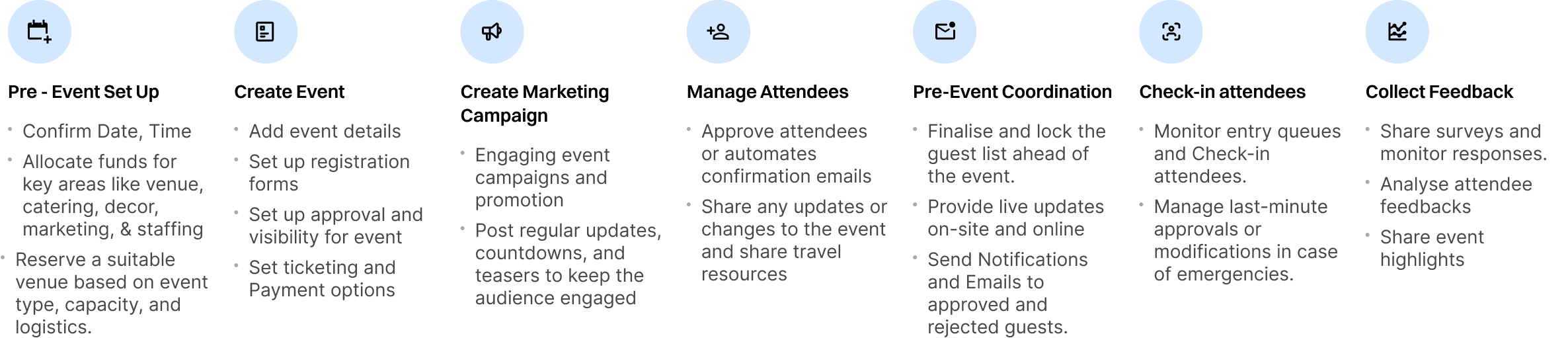
After speaking with event organisers and managers, we discovered that they often have limited tech proficiency, prefer simplicity, and operate under tight time constraints. Their priorities shift depending on the phase of the event flow, such as pre-event setup, event execution, guest management, and post-event activities. For instance, during the pre-event phase, organisers focus on logistics and promotion, while during the event itself, they prioritise guest engagement and coordination
After speaking with event organisers and managers, we discovered that they often have limited tech proficiency, prefer simplicity, and operate under tight time constraints. Their priorities shift depending on the phase of the event flow, such as pre-event setup, event execution, guest management, and post-event activities. For instance, during the pre-event phase, organisers focus on logistics and promotion, while during the event itself, they prioritise guest engagement and coordination
Journey of hosting an event
Journey of hosting an event
Key Issues
Key Issues
Onboarding new event organisers proved to be a time-consuming task, and users expressed frustration, particularly when there were multiple collaborators involved. Key information being exclusively available in a side panel made it challenging to access and often led to oversight. Furthermore, the event layout had only 2-3 sections visible at a time for editing, causing a time-consuming editing process. Some of the key problems we wanted to tackle were:
Onboarding new event organisers proved to be a time-consuming task, and users expressed frustration, particularly when there were multiple collaborators involved. Key information being exclusively available in a side panel made it challenging to access and often led to oversight. Furthermore, the event layout had only 2-3 sections visible at a time for editing, causing a time-consuming editing process. Some of the key problems we wanted to tackle were:
1
1
Lack of
overview
Lack of
overview
2
2
Difficulty in accessing
& managing information
Difficulty in accessing
& managing information
3
3
Difficulty in identifying
errors
Difficulty in identifying
errors
4
4
Tougher to collaborate &
make changes
Tougher to collaborate &
make changes
Iterations
We tried ideations where we kept the layout feature for the organiser as an advanced layout feature for organisers. However, user research revealed it added complexity without significant value, leading us to remove it in favour of a simpler, more intuitive design. We further structured navigation to group related features logically and tested with our community
We tried ideations where we kept the layout feature for the organiser as an advanced layout feature for organisers. However, user research revealed it added complexity without significant value, leading us to remove it in favour of a simpler, more intuitive design. We further structured navigation to group related features logically and tested with our community


Card Sorting for Information architecture
Final Interface
Navigation inside event
Navigation inside event
As part of the redesign, I reworked the navigation bar to improve usability and clarity. The settings were reorganized into distinct tabs, including Overview, Guests, Registration, and Settings, to better categorize functions. A new "Overview" tab was introduced, and the guest list was separated from insights as the it is needed more frequently during management and check-Ins at the event. Insights were moved to the bottom since they are primarily accessed after the event concludes.
Additionally, the event guest pages were visually separated with a line from tabs used for editing and managing the event, ensuring a clearer distinction between management and attendee-related actions. To assist new users, the navigation bar remains open, as icons alone can be hard to interpret.
As part of the redesign, I reworked the navigation bar to improve usability and clarity. The settings were reorganized into distinct tabs, including Overview, Guests, Registration, and Settings, to better categorize functions. A new "Overview" tab was introduced, and the guest list was separated from insights as the it is needed more frequently during management and check-Ins at the event. Insights were moved to the bottom since they are primarily accessed after the event concludes.
Additionally, the event guest pages were visually separated with a line from tabs used for editing and managing the event, ensuring a clearer distinction between management and attendee-related actions. To assist new users, the navigation bar remains open, as icons alone can be hard to interpret.

Overview for Event
Overview for Event
The Overview tab was designed to provide hosts with quick access to essential and time-sensitive information. It includes key actions related to the event, such as event settings, live check-in data, invitation lists, and pending applicant lists—critical details for organisers to manage efficiently. The page also offers easy access to basic event information, including the title, date, time, description, and photos, ensuring all essential details are readily available at a glance.
The layout feature was removed to eliminate confusion, prioritizing simplicity and efficiency over extensive creative control. Instead, we added a redirect for event page on the toolbar, allowing organisers to preview the event as guests would see it.
The Overview tab was designed to provide hosts with quick access to essential and time-sensitive information. It includes key actions related to the event, such as event settings, live check-in data, invitation lists, and pending applicant lists—critical details for organisers to manage efficiently. The page also offers easy access to basic event information, including the title, date, time, description, and photos, ensuring all essential details are readily available at a glance.
The layout feature was removed to eliminate confusion, prioritizing simplicity and efficiency over extensive creative control. Instead, we added a redirect for event page on the toolbar, allowing organisers to preview the event as guests would see it.

Event Stage
The Overview page adapts to the event stage, offering different insights before and after the event.
The Overview page adapts to the event stage, offering different insights before and after the event.
Before the event
Before the event

Central hub for organisers to manage and review key information, registrations, applicants and quick actions. This ensures organisers can efficiently prepare and manage pre-event logistics.
Central hub for organisers to manage and review key information, registrations, applicants and quick actions. This ensures organisers can efficiently prepare and manage pre-event logistics.
After the event
After the event
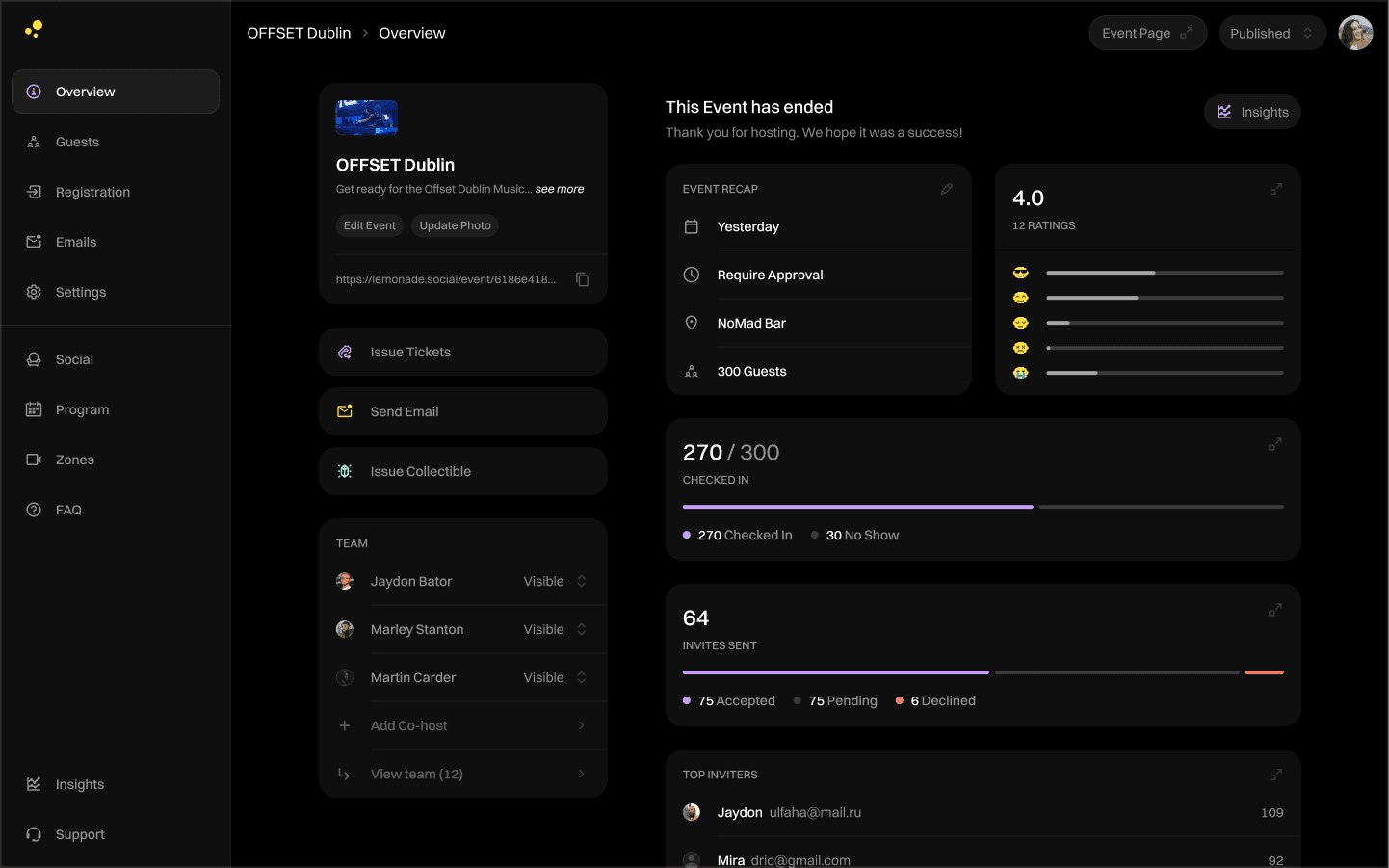
Recap hub, showing the date, time, guest feedback (overall score and individual responses), check-in stats, accepted invites, reward claims, and top inviters. This helps organisers review performance and gather insights efficiently.
Recap hub, showing the date, time, guest feedback (overall score and individual responses), check-in stats, accepted invites, reward claims, and top inviters. This helps organisers review performance and gather insights efficiently.
Registration
Registration
To improve event management, we separated registration actions from settings. The "Tickets" tab was renamed to "Registration," combining tickets, discounts, sales overview, and the application form to make it easier for organisers to manage everything in one place.
To improve event management, we separated registration actions from settings. The "Tickets" tab was renamed to "Registration," combining tickets, discounts, sales overview, and the application form to make it easier for organisers to manage everything in one place.

Learnings
Learnings
By understanding the difference between design-based and template based tool, we focused on offering a simplified editing process with predefined options. This made it accessible to users who valued simplicity and efficiency over extensive creative control. We prioritised making important information easily discoverable, avoiding overwhelming users with excessive choices.
By understanding the difference between design-based and template based tool, we focused on offering a simplified editing process with predefined options. This made it accessible to users who valued simplicity and efficiency over extensive creative control. We prioritised making important information easily discoverable, avoiding overwhelming users with excessive choices.

Made with care and plenty of coffee
Made with care and plenty of coffee