Cutting
check-in friction
Cutting
check-in friction
Cutting
check-in friction
Streamlining how organisers scan and communicate, while giving attendees one-tap access to their tickets.
Streamlining how organisers scan and communicate, while giving attendees one-tap access to their tickets.
Streamlining how organisers scan and communicate, while giving attendees one-tap access to their tickets.

Overview
Lemonade Social is a platform for creating and managing both in-person and virtual events. It allows users to easily set up event pages, invite participants, sell tickets, and streamline the planning process, ensuring a smooth experience for attendees.
Lemonade Social is a platform for creating and managing both in-person and virtual events. It allows users to easily set up event pages, invite participants, sell tickets, and streamline the planning process, ensuring a smooth experience for attendees.
Role
Role
Product Designer
Product Designer
Timeline
Timeline
1 month
1 month
Team
Team
4 people
4 people
Research
Currently, attendees rely heavily on support calls to access their tickets or get additional help with the event. To address this, we aimed to enhance the attendee experience by simplifying entry, empowering empowering hosts and attendees; and in turn reducing support channel costs.
Currently, attendees rely heavily on support calls to access their tickets or get additional help with the event. To address this, we aimed to enhance the attendee experience by simplifying entry, empowering empowering hosts and attendees; and in turn reducing support channel costs.
User interviews with attendees, on-ground staff, and event hosts.
Observations of the current check-in process.
Feedback collection on attendee pain points and team challenges.
User interviews with attendees, on-ground staff, and event hosts.
Observations of the current check-in process.
Feedback collection on attendee pain points and team challenges.
Journey of attending an event
This mapping focuses on the attendee's journey from buying a ticket to attending an event, highlighting the interaction between attendees and organizers, and the benefits each gains from it.
This mapping focuses on the attendee's journey from buying a ticket to attending an event, highlighting the interaction between attendees and organizers, and the benefits each gains from it.

Attendees often struggled to locate their ticket as it was only accessed on the email received upon confirmation of buying ticket. They expressed frustration with long wait times at check-in and difficulty locating their tickets, which were only accessible via the confirmation email. Many suggested the addition of more payment options and highlighted a lack of awareness about the various activities and programs available within the event.
Attendees often struggled to locate their ticket as it was only accessed on the email received upon confirmation of buying ticket. They expressed frustration with long wait times at check-in and difficulty locating their tickets, which were only accessible via the confirmation email. Many suggested the addition of more payment options and highlighted a lack of awareness about the various activities and programs available within the event.
The absence of reliable ticket confirmation and easy access caused problems for the on-ground team, hosts, and customer support as attendees frequently contacted them for assistance.
The absence of reliable ticket confirmation and easy access caused problems for the on-ground team, hosts, and customer support as attendees frequently contacted them for assistance.
Goal of improving the attendees experience
Based on our all of our findings shown above, we narrowed our focus into 4 areas for potential improvement of our Check In Experience:
Organiser at the Event :
1. Improve Check In Management
2. Include ways to communicate with guests
For attendees at the event :
1. Improve Event information and reminders
2. Improve access to ticket and QR
Based on our all of our findings shown above, we narrowed our focus into 4 areas for potential improvement of our Check In Experience:
Organiser at the Event :
1. Improve Check In Management
2. Include ways to communicate with guests
For attendees at the event :
1. Improve Event information and reminders
2. Improve access to ticket and QR
Iterate, Iterate and Iterate
Organiser at the Event
Previously, hosts checked in guests by scanning QR codes or searching the guest list to access attendee information. This included ticket details, purchase and approval timelines, application forms, and attendee profiles.
The detailed information slowed check-ins, causing delays in long queues.
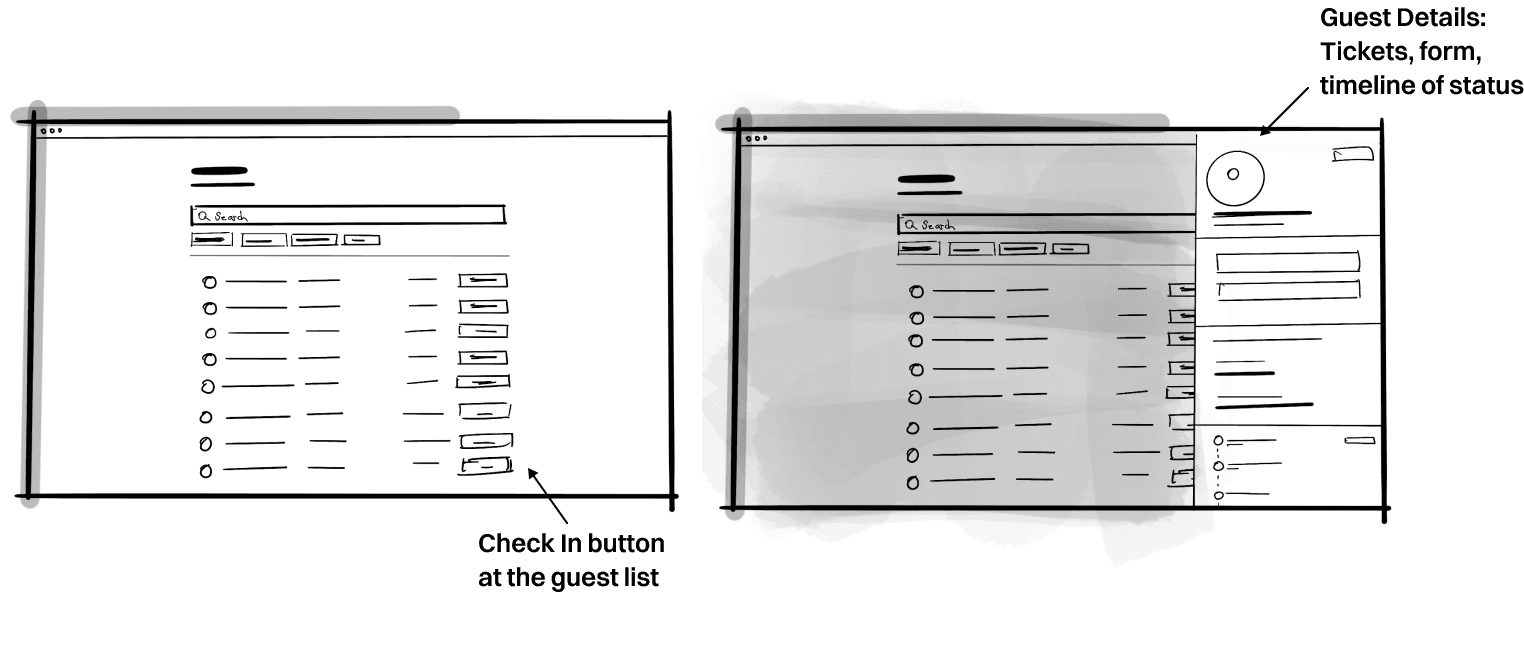
We separated the guest list and check-in process. Initially, we included a check-in button for each guest, but this approach was not ideal as hosts needed to view ticket types during check-ins.
Previously, hosts checked in guests by scanning QR codes or searching the guest list to access attendee information. This included ticket details, purchase and approval timelines, application forms, and attendee profiles.
The detailed information slowed check-ins, causing delays in long queues.
We separated the guest list and check-in process. Initially, we included a check-in button for each guest, but this approach was not ideal as hosts needed to view ticket types during check-ins.
For attendees at the event
To improve accessibility we added a dedicated check-in tab for ticket-related actions, keeping other tabs focused on social, event info, and FAQs.
Reasons to cancel : We tested this and discovered that the attendees do not tend to explore the other tabs. Due to this there was limited engagement with social features and event activities.
To improve accessibility we added a dedicated check-in tab for ticket-related actions, keeping other tabs focused on social, event info, and FAQs.
Reasons to cancel : We tested this and discovered that the attendees do not tend to explore the other tabs. Due to this there was limited engagement with social features and event activities.


Final Interface
Organisers at the event
Scanning at the event
For app, check-in by default opens scanning QR as mobile is preferable. “Check-in” confirmation is clear and not disruptive. Instead of taking over the screen, a small toast notification pops up, letting organizers keep scanning without interruptions. Clear colour cues now show whether a ticket is valid or invalid, making it easy to spot.
For app, check-in by default opens scanning QR as mobile is preferable. “Check-in” confirmation is clear and not disruptive. Instead of taking over the screen, a small toast notification pops up, letting organizers keep scanning without interruptions. Clear colour cues now show whether a ticket is valid or invalid, making it easy to spot.
Check In via guestlist
This Check-in List is seperated from the event manage page, it provides on-ground teams with live updates on attendee check-ins without any distractions, enabling them to monitor entry points and manage attendee flow effectively. Hosts can see the number of people already checked in, pending arrivals, and no-shows, allowing them to make quick, informed decisions.
Additionally, the list includes features like filtering data by ticket type, viewing group check-ins, and identifying VIP attendees for a more personalised experience. Now, when a guest is searched, their details shows only the tickets purchased, allowing hosts to check in each ticket individually. This helps the host to only focus on the check ins.
This Check-in List is seperated from the event manage page, it provides on-ground teams with live updates on attendee check-ins without any distractions, enabling them to monitor entry points and manage attendee flow effectively. Hosts can see the number of people already checked in, pending arrivals, and no-shows, allowing them to make quick, informed decisions.
Additionally, the list includes features like filtering data by ticket type, viewing group check-ins, and identifying VIP attendees for a more personalised experience. Now, when a guest is searched, their details shows only the tickets purchased, allowing hosts to check in each ticket individually. This helps the host to only focus on the check ins.
Organisers can view the full list of registered attendees alongside invited guests, applicants, and those who declined.Hosts can check a guest's status and update it if they're not registered, completing the check-in process with one click for a smooth entry.
Organisers can view the full list of registered attendees alongside invited guests, applicants, and those who declined.Hosts can check a guest's status and update it if they're not registered, completing the check-in process with one click for a smooth entry.
Communication and quick updates
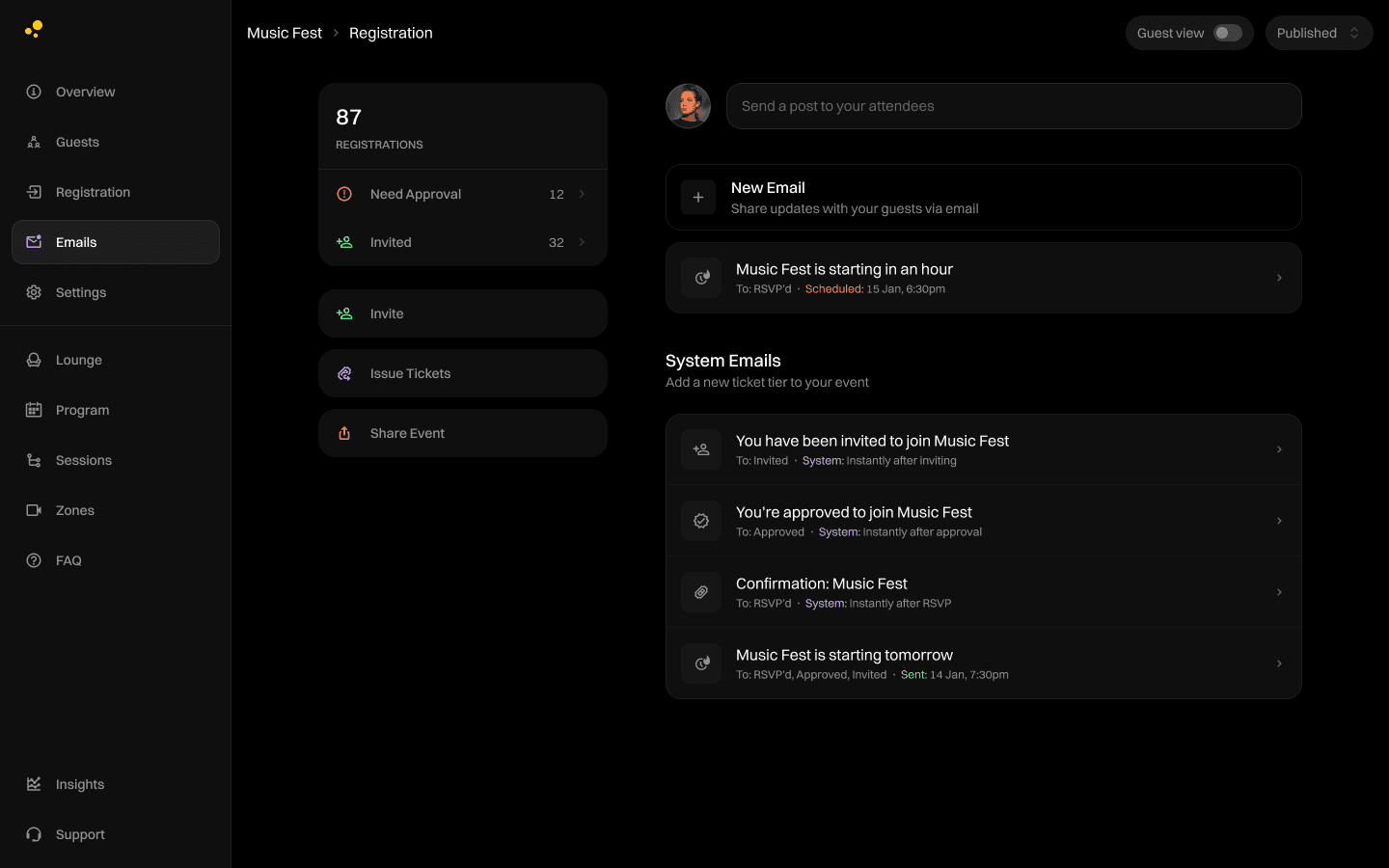
We designed an email feature to give organizers more control over their communication. Organizers can send tailored emails to invitees, applicants, registrants, and those who declined. To simplify the process, we’ve provided default templates for success, reminder, and feedback emails.
To ensure critical system emails, like ticket confirmations, remain intact, the option to delete is disabled so they don’t get deleted accidentally. Emails can be scheduled for a later time or sent immediately, and organizers can test emails by adding a test email address before sending.
We designed an email feature to give organizers more control over their communication. Organizers can send tailored emails to invitees, applicants, registrants, and those who declined. To simplify the process, we’ve provided default templates for success, reminder, and feedback emails.
To ensure critical system emails, like ticket confirmations, remain intact, the option to delete is disabled so they don’t get deleted accidentally. Emails can be scheduled for a later time or sent immediately, and organizers can test emails by adding a test email address before sending.

For attendees at the event
Ticket access
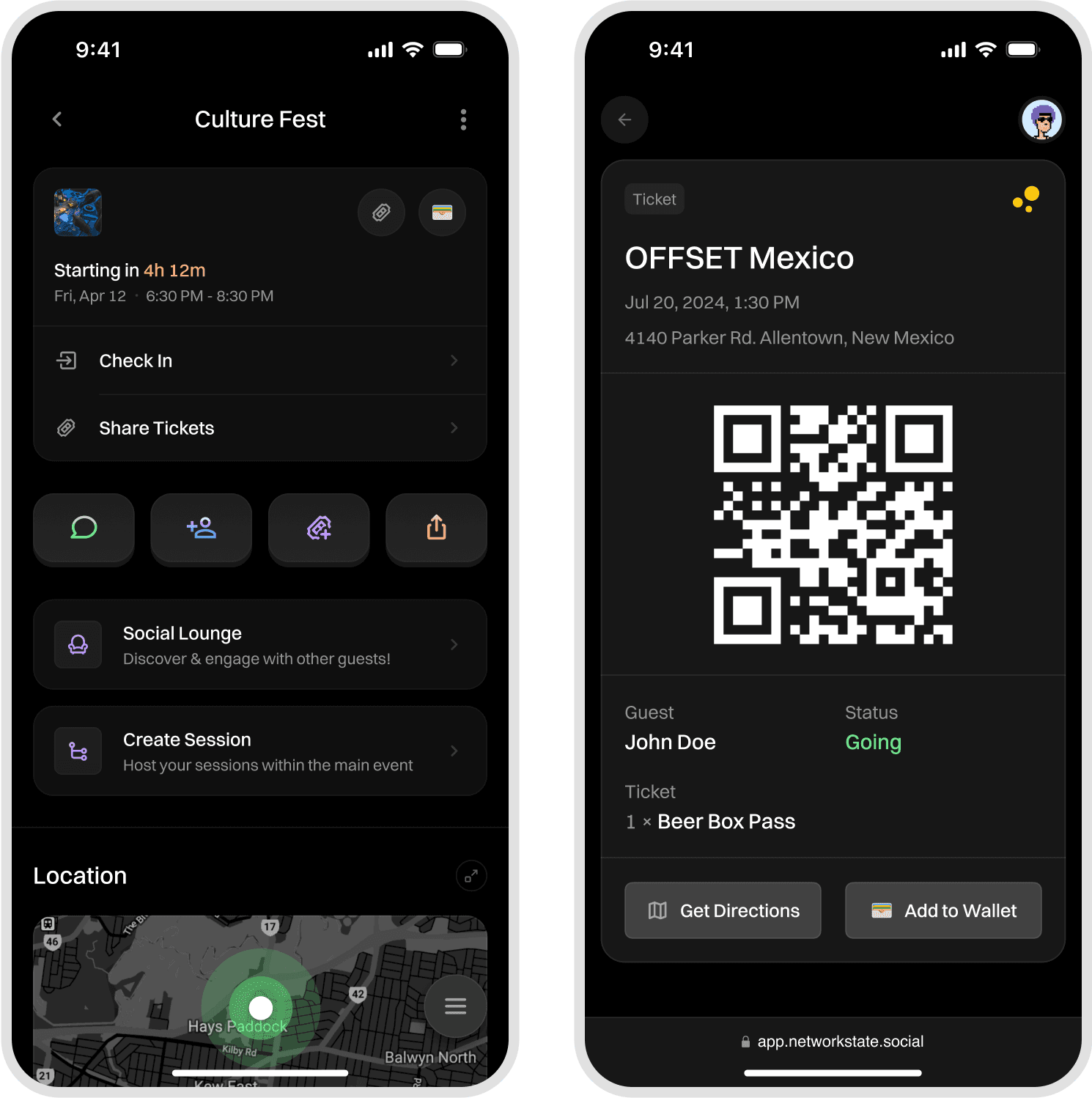
The event page and confirmation email includes a QR code that lists all tickets purchased by the attendee for seamless check-in. This same QR code also allows attendees to claim samples or rewards at the event.
The event page and confirmation email includes a QR code that lists all tickets purchased by the attendee for seamless check-in. This same QR code also allows attendees to claim samples or rewards at the event.
Socialise at the event
Lemonade’s social features have been moved to the forefront of the event page, making it easy for attendees to share posts, join live chats, and connect with others in real time. Attendees can explore the sessions (an sub-event made by other attendees) on the same event page. They can add it to their calendar
Lemonade’s social features have been moved to the forefront of the event page, making it easy for attendees to share posts, join live chats, and connect with others in real time. Attendees can explore the sessions (an sub-event made by other attendees) on the same event page. They can add it to their calendar
Outcome
By simplifying ticket verification and introducing clear ticket states, the system reduced support tickets related to entry issues by 40%, allowing the team to focus on higher-priority problems during live events.
The new flow also reduced average check-in time significantly, allowing queues to move faster during peak entry.

Made with care and plenty of coffee
Made with care and plenty of coffee